Friday, 27 August 2010

Add Total Row and Column

Ever needed to add Row and Column totals to your data tables in Alteryx?  This macro makes it easy!

From this:

 
To this:


With this:


Download the macro here:


Monday, 12 July 2010

Tips and Tricks - The Browse Tool

The humble browse tool is probably the most used tool in the Alteryx toolbox, it is a great way to take a look at your data at any point in your module; but how many of you use more than its default settings?  Score yourself out of ten for how many of the following tips and tricks you already knew about the browse tool.

1.  You can select which columns you want to look at and the module will remember these selections:


Great for when you need to check two fields against each other.

2. The browse tool will tell you if a data cell has leading spaces; trailing spaces or embedded newlines by displaying a little red triangle in the corner of the cell.  Hovering over the red triangle displays the message:
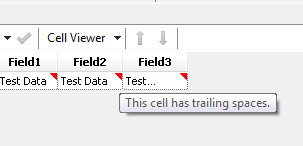


3. The "Cell Viewer" button lets you examine the contents of an individual cell and with "Show Whitespace"
turned on shows you all of those leading/trailing spaces and embedded newlines:


4. The cell viewer pane also gives information on fields and rows by clicking on the header/row label cells:


5. It is possible to split the browse tool vertically or horizontally.  Great for comparing records in different rows of the file:


or viewing spatial data in map and tabular form:


6. In the split map/data table view.  Selecting a data row in the table will highlight that spatial object on the map and selecting a spatial object on the map will highlight the corresponding data row.

7. Need to compare records from two different browses in the same module?  No problem! The new window button will create a new floating browse window of the current data; then switch the original properties window to the other browse and compare away.


8. You can save records (all or a selection) directly from the browse tool.  Useful when you have spotted an issue and want to send the records to someone or do some further analysis elsewhere.


9. You can copy records from the browse tool and paste them directly into a text input tool.  Really useful if you need to take a few records into a second module to some extra analysis:

10. The browse tool will display up to 1 billion rows.  After that it only displays alternate rows, but maintains the correct row numbers in the first column.

So how many did you score out of ten?  Post your scores in the comments below and let me know if you think of any others I have missed.

Friday, 9 July 2010

Alteryx Customer Advisory e-Forum (Part 2)

It was great to see such a good attendance for this; I thought it was a really interesting event.  Thanks to all the other presenters for sharing what they are doing with Alteryx.

As promised here are my slides:


Looking forward to the next one!

Tuesday, 29 June 2010

Alteryx Customer Advisory e-Forum

I'm looking forward to the first Alteryx e-Forum on Thursday.  I'm going to be talking about a recent project I have completed at Experian involving a server based setup of Alteryx; a custom queuing application using the API and a terabyte of Calgary databases.

For anyone who hasn't already seen the details, they are here.  Hope to "see" you all there!

Friday, 28 May 2010

FormulaAddIn (or 3Rd Floor Flat part 2)

Well the next question from my 3Rd Floor Flat user was "So do I need to use that big long formula every time I want to title case something?" and of course for a common task for a user that's not ideal.  First thought was to wrap it in a macro, but that feels like overkill for a simple task.  Then I remembered something I had seen in the Software Developer's Kit - FormulaAddIns!

Did you know it is possible to create your own functions to appear in the formula tool?  And what's more for ones which can be built using existing functions it's really quite easy.

For the lack of a better name I've called my new function TITLECASE2 and if you create the folder

C:\Program Files\SRC\Alteryx5.0\RuntimeData\FormulaAddIn\

and save the below xml file into it,


then restart Alteryx you will find TITLECASE2 appears right there in the function list under TITLECASE; giving me the elegant solution I was looking for.  I think the xml is fairly self explanatory, but let me know if you have any questions on it.

Thursday, 27 May 2010

3Rd Floor Flat

Should TitleCase("3rd floor flat") resolve to 3Rd Floor Flat? Alteryx thinks it does, I'm not so sure...  But the question I had from a user on Friday was how do I turn "3rd floor flat" into "3rd Floor Flat"?  Which of course is what you would want on an address envelope. 

My first solution involved using a regex tool to pull the first letters out then the dynamic formula macro to build the string back together captilasing the first letters.  I wasn't overly happy with the solution though  (far too many tools for a simple task) so after some more thinking have come up with the following formula:

REGEX_REPLACE(TitleCase(REGEX_REPLACE([Field1], "(\d)", "$1X")), "(\d)X", "$1")

(which I think should always work...)

Anyone think they can come up with a more elegant solution?

Friday, 14 May 2010

Dynamic Formula

A recent post on the Alteryx forum from Stephs (here) got me thinking: wouldn't it be useful if there was a Dynamic formula tool?  I think this would solve Stephs problem in that they could build formulas (with the formula tool) to compare the fields and use an if statement to choose between the file and database version and then push the data back to the database (that's if I've understood the problem correctly, if not I've already thought of some other great uses for this tool.).

Well the motto of any advanced user of Alteryx should be "If you want a new tool in Alteryx, build it!" So here it is:


Just drop all the files in the zip into your macros folder. Usually something like C:\Program Files\SRC\Alteryx5.0\RuntimeData\Macros\.

The two interesting features of this macro are :
  • It's the first time I have made use of the macro action "Update Raw XML", which worked very nicely.
  • I have used the batch macro tool in a way it wasn't particularly designed for.  I used it to run a single iteration which you might think defeats the point of the 'batch' feature, but it allows you to take data from the data stream and insert into the properties of the formula tool.  Using this technique, any Alteryx tool could be made to have dynamic properties!  I'm sure there must be some more uses out there for this technique.
Now for one of those other uses I've thought of.  Remember this query from the Alteryx Team blog here?

Hi Tara,
I have a table with 60+ fields. I need to create an extra field that is the total of all the 60+ fields. So far, I've been doing this with the formula tool and writing an expression as follows "[01]+[02]+[03]+[04]+[05]+[06]+[07]+[08]+[09]+[10]+[11]+[12]+[13]+[14]+[15]….. etc". Just wondering if there is a quicker way to do this? If not, can you add as a suggestion for a future release?
Thanks,

Well with the dynamic formula tool you can write this formula dynamically!  Plus it becomes very easy to also create subtotals based of the field names.  Check out the below module showing how this could work:


If anyone else thinks of some other uses for this tool then add a comment here or drop me a note.